 Neon
Neon
Neon
NeonYou can override operators for containers (as shown earlier) and modules.
# Define a Complex container
c1 = Complex(real: 1, imag: 2)
c2 = Complex(real: 3, imag: 4)

# Overload +
function Complex~add(a, b) do
    return (Complex(real: a>>real + b>>real, imag: a>>imag + b>>imag))
end

# Overload *
function Complex~mul(a, b) do
    realPart = a>>real * b>>real - a>>imag * b>>imag
    imagPart = a>>real * b>>imag + a>>imag * b>>real
    return (Complex(real: realPart, imag: imagPart))
end

# Now use overloaded operators
c3 = c1 + c2  # → Complex(4, 6)
c4 = c1 * c2  # → Complex(-5, 10)
Override how containers are printed or converted to strings.
print for a Containerfunction Person~repr(p) do
return (p>>firstName + " " + p>>lastName + " (" + str(p>>age) + ")")
end
alice = Person(firstName: "Alice", lastName: "Smith", age: 30)
print(alice) # → "Alice Smith (30)"
eval FunctionEvaluates a string as Neon code and returns the result.
result = eval("2 + 3 * 4")  # → 14
x = 10
result = eval("x * 2")       # → 20
eval can execute arbitrary code (security risk if used with untrusted input).safeExec FunctionRuns a Neon program in an isolated environment with given arguments.
safeExec("filename.ne", [arg1, arg2, ...])
safeExec("script.ne", ["arg1", 42])
~ Character in Modules~ character is reserved for modules.help FunctionGet information about objects, modules, or variables.
help("modules")      # List all modules
help("variables")    # List all variables and their types
help("Math")         # List all objects in the Math module
help(add)           # Show help for the add function
help(42)            # Show type of 42 (Integer)
Neon provides a graphics extension for TI-EZ80 calculators (TI-83 Premium CE, TI-84 Plus CE).
init(Graphics) # Must be called first
| Type | Fields | Description |
|---|---|---|
Point |
x, y |
A point on a polygon outline. |
Circle |
x, y, r (radius), c (color), f (filled) |
A circle. |
Rect |
x, y, w (width), h (height), c (color), f (filled) |
A rectangle. |
Line |
x0, y0, x1, y1, c (color) |
A line. |
Text |
t (text), x, y, fg (foreground color), bg (background color), s (size) |
Text. |
Triangle |
x0, y0, x1, y1, x2, y2, c (color) |
A triangle (always filled). |
Polygon |
p (points), c (color) |
A polygon (list of Points). |
Ellipse |
x, y, a, b, c (color), f (filled) |
An ellipse (a = horizontal radius, b = vertical radius). |
FloodFill |
x, y, c (color) |
Fills an area with a color. |
rgb(r, g, b) to convert from 0-255 RGB values.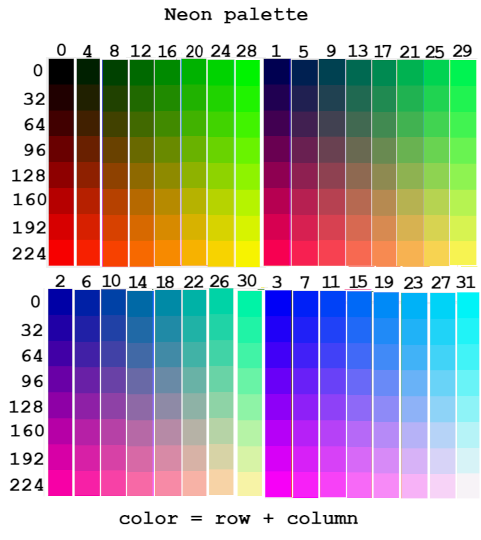
init(Graphics)

# Draw a red circle
circle = Circle(x: 100, y: 100, r: 50, c: rgb(255, 0, 0), f: True)
draw(circle)

# Draw a green rectangle
rect = Rect(x: 50, y: 50, w: 80, h: 40, c: rgb(0, 255, 0), f: False)
draw(rect)

# Draw a line
line = Line(x0: 0, y0: 0, x1: 319, y1: 239, c: rgb(0, 0, 255))
draw(line)

# Draw text
text = Text(t: "Hello, Neon!", x: 10, y: 20, fg: rgb(255, 255, 255), bg: rgb(0, 0, 0), s: 1)
draw(text)
Use getKey() to read key presses.
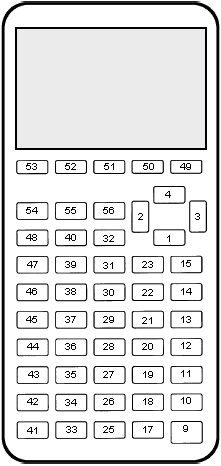
init(Graphics)

# Player position
playerX = 100
playerY = 100

while (True) do
    # Clear screen (draw a black rectangle)
    draw(Rect(x: 0, y: 0, w: 320, h: 240, c: 0, f: True))

    # Draw player (white circle)
    draw(Circle(x: playerX, y: playerY, r: 10, c: rgb(255, 255, 255), f: True))

    # Handle input
    key = getKey()
    if (key == 24) then  # 7 key
        playerY -= 5
    elif (key == 25) then  # 8 key
        playerY += 5
    elif (key == 33) then  # 2 key
        playerX -= 5
    elif (key == 34) then  # 3 key
        playerX += 5
    elif (key == 41) then  # ON key
        break
    end

    # Keep player on screen
    if (playerX < 0) then playerX = 0 end
    if (playerX > 319) then playerX = 319 end
    if (playerY < 0) then playerY = 0 end
    if (playerY > 239) then playerY = 239 end

end
Neon provides functions to read and write files.
| Function | Description |
|---|---|
readFile(filename) |
Reads a file and returns its content as a string. |
writeFile(filename, content) |
Writes a string to a file (overwrites if exists). |
detectFiles(prefix) |
Returns a list of filenames whose contents begin with prefix. |
# Write to a file
writeFile("hello.txt", "Hello, Neon!")

# Read from a file
content = readFile("hello.txt")
print(content)  # → "Hello, Neon!"

# List files starting with "data"
files = detectFiles("data")
print(files)  # e.g., ["data1.txt", "data2.txt"]
writeFile("MYDATA", "Some data")
content = readFile("MYDATA")
| Variable | Description |
|---|---|
Pi |
The mathematical constant π (~3.14159). |
__name__ |
"__main__" in the main script, otherwise the filename. |
__platform__ |
Platform ("LINUX_AMD64", "WINDOWS_AMD64", "TI_EZ80"). |
__version__ |
Neon interpreter version. |
__args__ |
List of command-line arguments (in execution mode). |
Ans |
Last result in console mode. |
print("Running on " + __platform__)
print("Neon version: " + __version__)
print("Pi: " + str(Pi))
setColor FunctionChange the text color in the console.
setColor("red")
print("This is red text!")
setColor("blue")
print("This is blue text!")
setColor("default")  # Reset to default
Use meaningful variable names:
# Bad
x = 10
y = 20

# Good
width = 10
height = 20
Comment your code:
# Calculate the sum of a list
function sumList(lst) do
    total = 0
    foreach (num, lst) do
        total += num
    end
    return (total)
end
Use functions to avoid repetition:
# Bad (repeated code)
print("Hello, Alice!")
print("Hello, Bob!")

# Good
function greet(name) do
    print("Hello, " + name + "!")
end
greet("Alice")
greet("Bob")
Handle errors gracefully:
try
    result = 10 / 0
except (DivisionByZero) do
    print("Error: Division by zero!")
end
Use local() to avoid side effects:
function safeModify(x) do
    local(x)  # Prevents modifying global x
    x += 1
    return (x)
end
Use await() for passive waiting in concurrent code:
# Bad (active waiting)
while (not condition) do
    pass
end

# Good (passive waiting)
await(condition)
Use atomic blocks for thread-safe operations:
atomic
    sharedCounter += 1
end
Organize code into modules:
# In math.ne
function Math~add(a, b) do
    return (a + b)
end

# In main.ne
import "math"
result = Math~add(2, 3)
isEven(n) that returns True if n is even, False otherwise.factorial(n) that calculates the factorial of n (recursively or iteratively).reverseString(s) that reverses a string without using the reverse function.Vector2D container with add, sub, and mul (scalar multiplication) operations.Congratulations! You’ve now learned the fundamentals (and advanced features) of the Neon programming language. Happy coding!